

At times it is necessary for an organization to self-assess use-tax on an invoice when the given supplier partner has not included tax as needed on the invoice document.
Depending on your organization’s EPRO workflow, you may be able to self-assess use-tax on an invoice within EPRO.
Accruing Use-Tax on the Receiving Screen
-
Log in to EPRO > View > Receiving
-
Select the invoice to be received
-
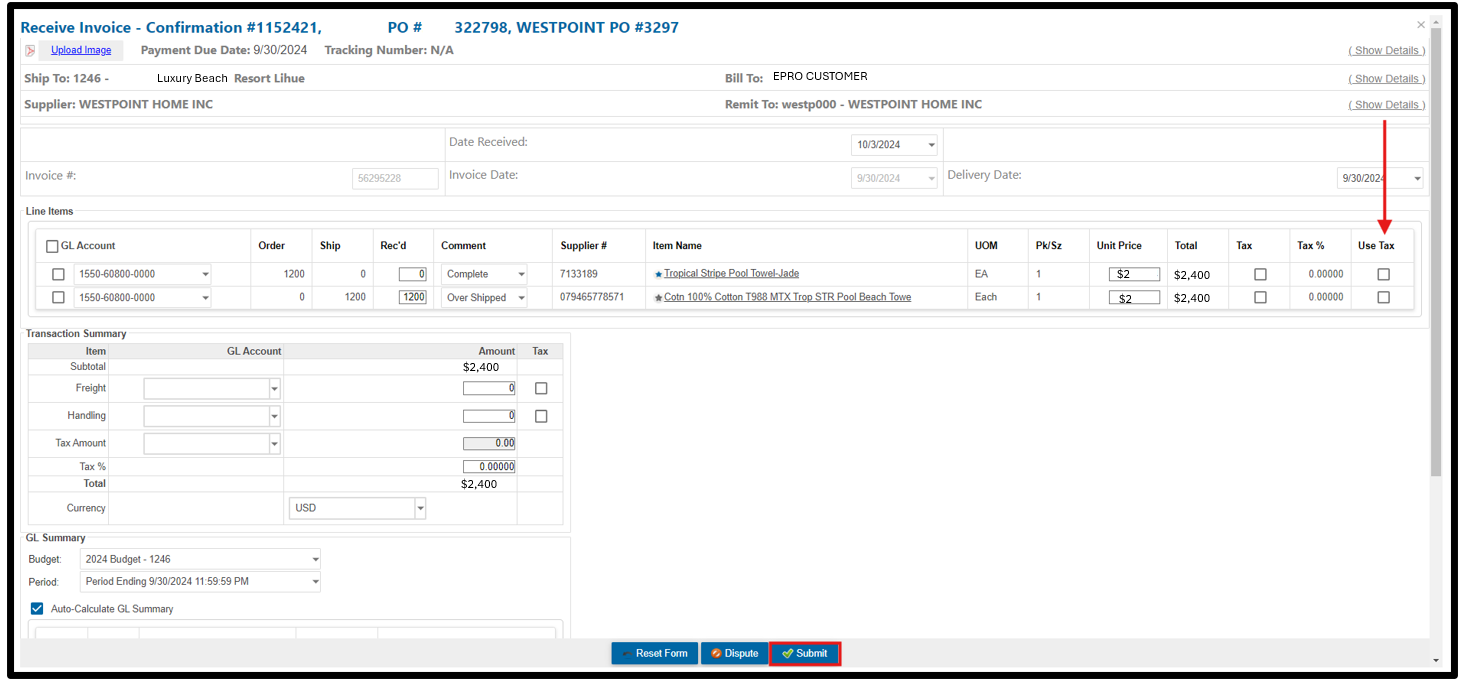
Review the invoice – if it’s determined that use-tax should be accrued, click the Use-Tax checkbox next to the item(s) which should have tax accrued
-
Continue with the necessary receiving actions
-
For additional detail on completing Receiving actions, click here: https://help.reactornet.com/docs/Working-version/receiving
-
-
Click Submit on the Receiving entry
-
After all approvals and reviews are completed, the invoice will transmit to your AP System.
-
Depending on your organization’s AP integration with EPRO, the invoice will route to your AP system either with a Use-Tax journal entry applied or an indicator to AP to perform Use-Tax calculations within the AP system.